


Apple has released iOS 26.0 Release Candidate, and it is now available for download. Apple has also released iPadOS 27.0 RC, macOS Tahoe 26 RC, watchOS 26 RC, tvOS 26 RC, and visionOS 26 RC.
If you’re already running iOS 26.0 beta on your iOS device, then you can download iOS 26 Release Candidate from the Software Update section of your device.
If you are new to iOS 26 and are installing it for the first time, then you can follow the instructions below to install the Release Candidate ahead of the official release.
With today’s iOS 26 RC release, Apple is preparing for the September 15 launch of iOS 26. If everything goes well, then today’s iOS 26 RC will be rolled out for everyone. If bugs are detected, then Apple will push out a different build of iOS 26 on the public release day.
Install iOS 26 RC on iPhone or iPad right now
Follow these steps to install iOS 26 RC on your iOS device right now. You can follow the same steps on an iPad to install iPadOS 26 RC.
- In Safari, open the Apple Beta Software Program website, and sign up with the Apple ID you are using on your iOS device.
- Follow the on-screen instructions to complete the sign-up process.
- Now, on your iPhone or iPad, open Settings and go to General.
- Tap on Software Update and then tap on the Beta Updates option.
- Next, make sure the iOS 26 Public Beta option is selected, and return to the previous screen.
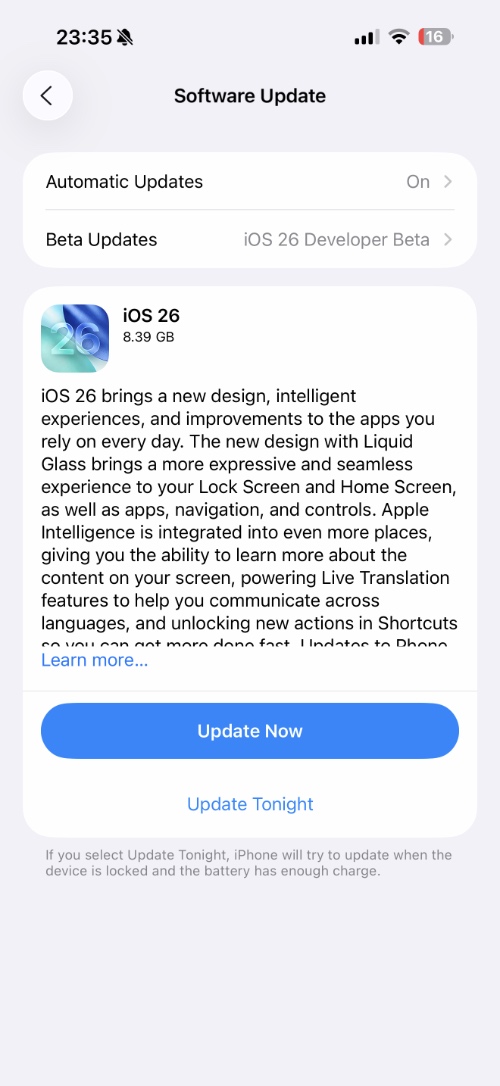
If you don’t see the iOS 26 RC download option yet, then you can force quit the Settings up from the App Switcher and go back to the Software Update section. You should see the download option now.
Still don’t see the iOS 26 download option? Restart your iPhone and try again.


