



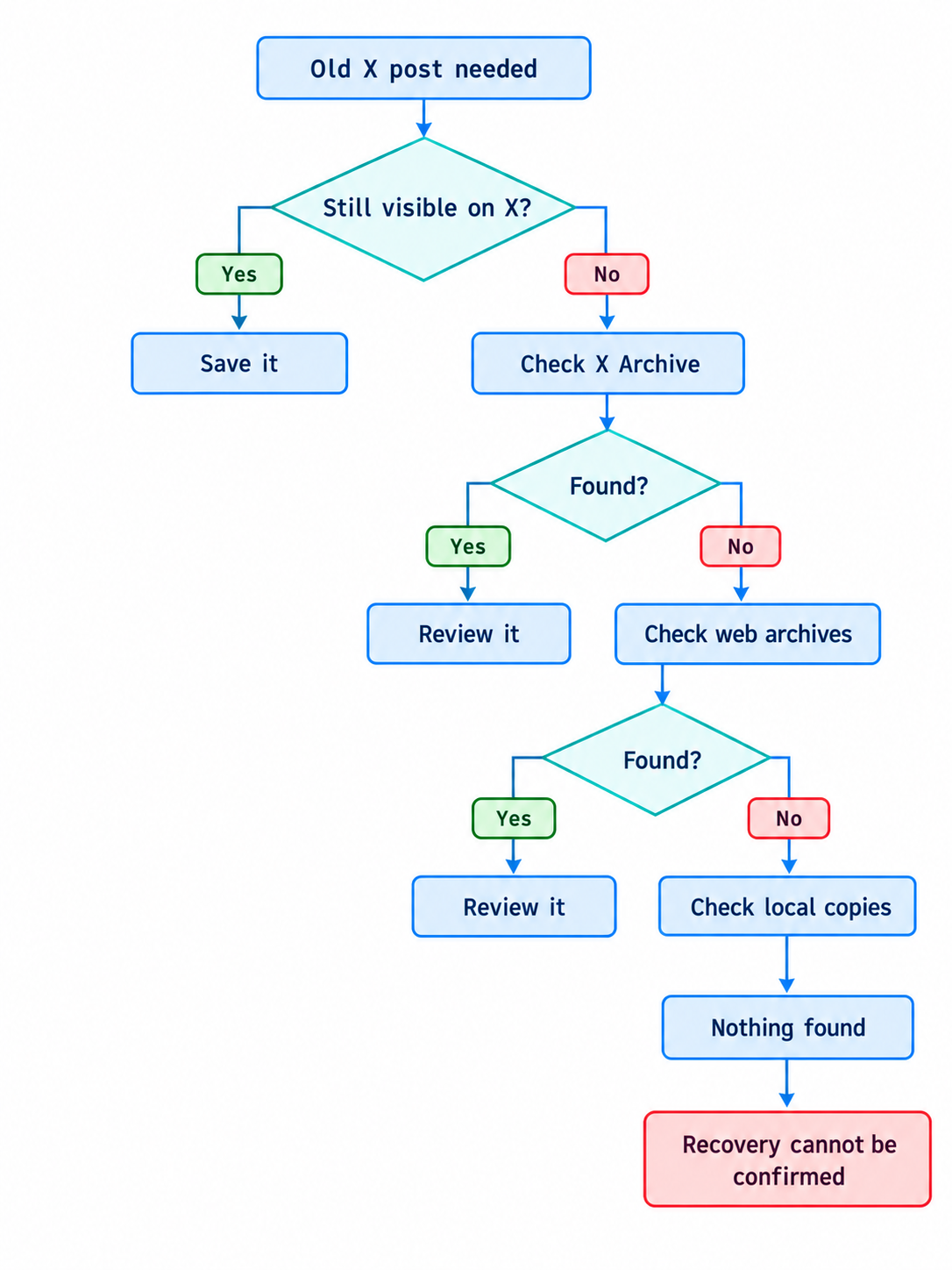
Recovering an old X post sounds simple until the original page is gone. A copy may still exist inside your X Archive, in the Wayback Machine, in a screenshot, or elsewhere online. These records are different, and each has limits.
Table of Contents
- 1. Recovery Can Mean Several Different Things
- 2. Your X Archive Is Usually the Best First Check
- 3. A Wayback Machine Capture Is a Different Kind of Record
- 4. Deleting a Post From X Does Not Remove Every Outside Copy
- 5. XDeleter Is Useful When You Already Have Account Data
- 6. The Old Post URL Can Matter More Than Remembered Wording
- 7. Some Recovered Copies Are Too Incomplete to Treat as the Original
- A Verified Copy Is More Useful Than a Perfect Reconstruction
The key question is whether a copy was saved before access disappeared. XDeleter explains this distinction in its guide, and you can check this tool for its workflow involving an X Archive and archived web content. The same page notes that the Wayback Machine does not save every page.
1. Recovery Can Mean Several Different Things
Finding a Copy Is Not the Same as Restoring the Post
A recovered record may be text inside an archive, a screenshot, or an old page capture. None of these returns the original post to your live X profile. X says deleted post content and associated metadata are no longer publicly available through X. A recovered copy remains separate from the original post.
Decide What You Actually Need
Sometimes only one detail matters, perhaps a sentence, URL, image, or publication date. In other cases, the thread or surrounding replies matter too. Knowing this before searching saves time. A screenshot may answer one question while being incomplete for another.
2. Your X Archive Is Usually the Best First Check
X allows account holders to request an archive from account settings. The download can contain posts, Direct Messages, media, follower information, Lists, and other account data. It gives a broader account record than the visible profile alone.
An Archive Is an Account Record
The archive matters because it comes from information connected to your own account. It can preserve text and media even when older posts are hard to locate. X provides the archive in files that can be reviewed locally.
X does not promise that every post deleted before a new archive request will appear. An archive downloaded earlier may therefore be more useful when reviewing older history.
3. A Wayback Machine Capture Is a Different Kind of Record
A web archive saves a captured version of a public page at a particular time. It is not the same as account data supplied by X. The Internet Archive states that it cannot guarantee every page has been archived.
The Page Had to Be Captured Earlier
The Wayback Machine cannot recreate a page it never saved. Pages may be absent because crawlers never discovered them, access was restricted, or the page could not be captured. XDeleter makes the same practical point in its deleted post guide.
A Capture Can Be Incomplete
An archived page may load without every image or page element. Internet Archive explains that missing images can mean those files were never captured. Some interactive parts can also fail, so text may survive while other details are gone.
The Exact URL Helps
The original post URL can make an archive search easier. The Wayback Machine lets users enter a specific URL and inspect available captures by date. Remembered wording may help, but a precise URL points directly to the page.
4. Deleting a Post From X Does Not Remove Every Outside Copy
X states that deleted posts may remain in search engine caches, other applications, or external websites. Copied text published by another account is also not removed when the original disappears. Parts of old content can therefore remain outside X.
Outside Copies Need Context
A search result may preserve one sentence. A screenshot can omit the date or part of a thread. A copied quotation may leave out a link. If exact wording matters, compare the copy with another record before treating it as complete.
5. XDeleter Is Useful When You Already Have Account Data
XDeleter describes a workflow built around an uploaded X Archive. Its current pages explain that archive data can be selected as a source and searched by keyword or date. The service also describes an Archive Tweets feature for keeping and browsing deleted post history.
The X Archive Workflow Narrows a Large History
The process starts by requesting the archive from X. Once available, XDeleter describes uploading it and searching its contents. A remembered phrase, project name, date range, or domain can reduce the number of entries requiring manual review.
Reviewing Does Not Mean Restoring
XDeleter states that deleted posts cannot be restored to X, even though archived history can be saved and reviewed. Finding old text is possible when a copy exists, but the original public post does not return.
6. The Old Post URL Can Matter More Than Remembered Wording
A URL gives the search a fixed reference point. Memory can change wording over time, while the status URL remains tied to one specific post. Even when the page no longer loads on X, that URL may help locate an archived capture.
Save Status URLs With Important Records
If certain posts may matter later, saving the URL beside the text adds useful context. The same record can include the date and media filename. These details make later verification easier.
Do Not Confuse a Search Result With a Full Copy
A result containing the old URL may show only a fragment or cached description. X confirms that deleted content can remain cached or copied outside its service. That trace can help, but it should not automatically be treated as the full post.
7. Some Recovered Copies Are Too Incomplete to Treat as the Original
Screenshots and Snippets Have Boundaries
A screenshot records only what was visible inside its frame. It may exclude replies, attachments, or part of a thread. Search snippets are usually even shorter. They can answer narrow questions but rarely provide the entire record.
Sometimes There Is No Recoverable Copy
Internet Archive states that not every page is captured. X also explains that deleted content is no longer publicly available through X itself. If the account archive lacks the post and no screenshot, saved file, or archived page exists, there may be no reliable recovery path.
A Verified Copy Is More Useful Than a Perfect Reconstruction
Know When the Search Has Reached Its Limit
Recovering an old X post is really a search for surviving records. Start with your own archive, then check saved URLs, local files, search traces, and web captures. Compare sources when only fragments survive. If no reliable record exists, the most accurate conclusion is that the original content can no longer be verified.
Disclaimer: This is a sponsored article.


