


If you want to turn off Face ID on your iPhone or iPad and only use a passcode for unlocking your device, then this article is for you.
Here we have shown you how you can stop using Face ID and disable it for things like unlocking iPhone, making payments, password autofills, and logging into apps.
We have also shown you how you can turn off Face ID for specific apps only.
Turn off Face ID
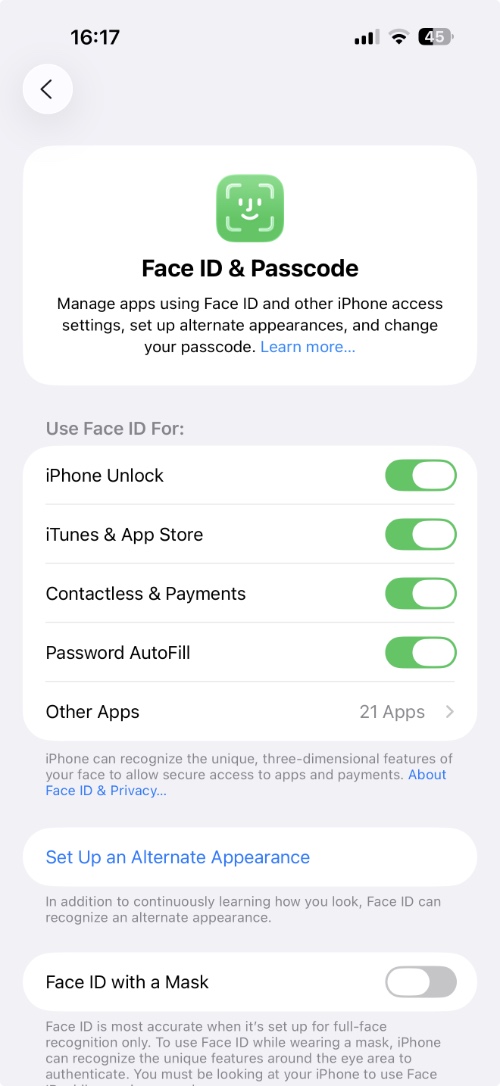
- On your iPhone, go to Settings and tap on Face ID & Passcode.
- Authenticate by entering your device’s passcode.
- On the next page, turn off the toggles for things you don’t want to use Face ID for, such as
- iPhone Unlock
- iTunes & App Store
- Contactless & Payments
- Password Autofill
- Other Apps -> Turn off toggles for apps you want to disable Face ID for.
- If you want to disable Face ID completely, then scroll down and tap on Reset Face ID.
When you reset Face ID on your device, iOS will erase saved face data from your device. After this, you will only be able to authenticate with a passcode.
There you have it, this is how you can disable Face ID on your iPhone or iPad and only use a passcode. With this guide, you can also turn off Face ID for specific third-party apps and iPhone features while keeping it on for others.


