


In this guide, you will learn how to send a WhatsApp message to someone without adding them to your iPhone’s contacts list first.
WhatsApp seems to have an odd requirement that makes you add a phone number to your contacts list before you can chat with them. However the good news is this is not true, and there’s actually a hidden way that lets you message someone without adding them first.
The issue is WhatsApp does not make it easy for you to send a message to someone without adding them to contacts list. But here’s how you can do it.
Chat on WhatsApp without saving number
- Start by tapping on the Calls tab from the bottom.
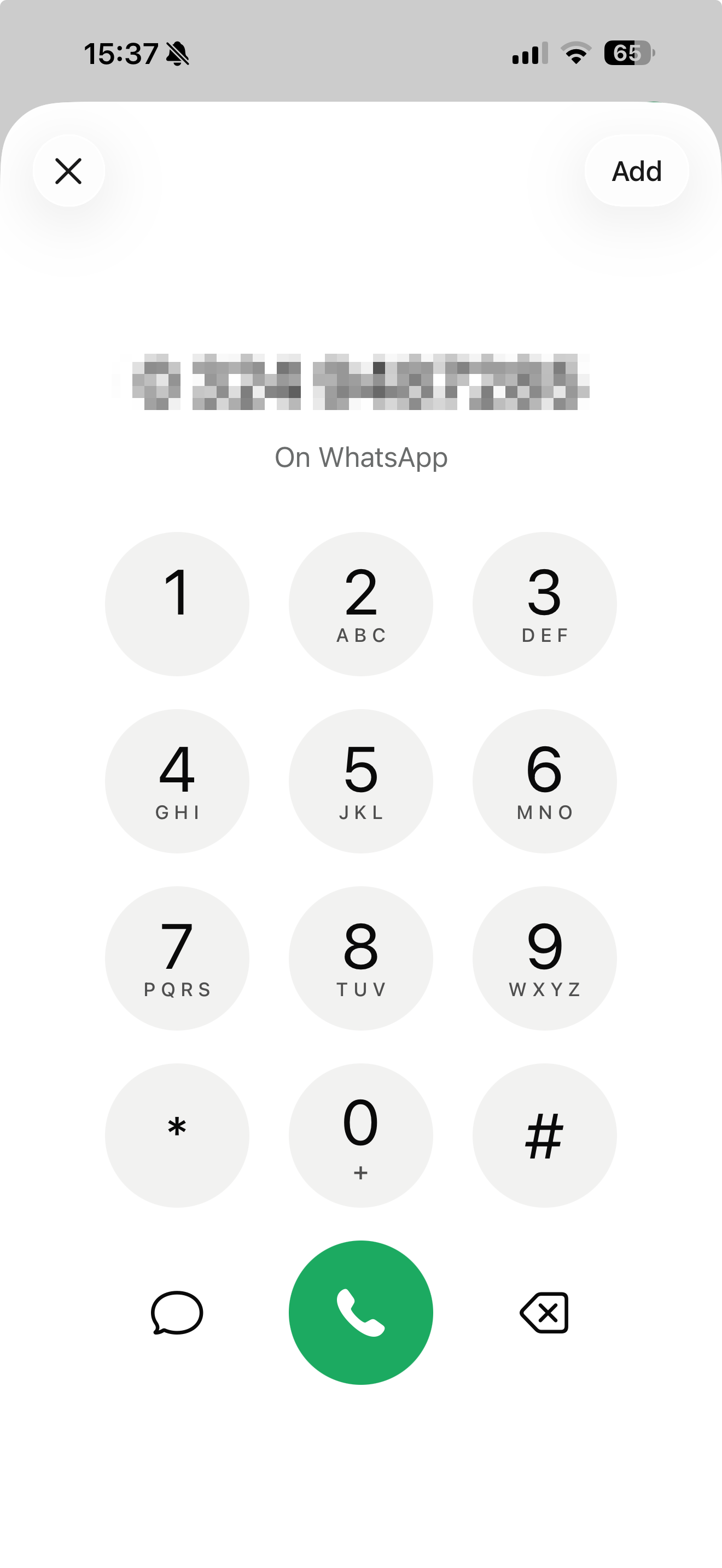
- Here look for the Keypad button and tap on it.
- Now you will see the keypad screen. Here type the number that you wish to send a message to without adding them to contacts list first.
- After typing the number WhatsApp will scan its database to see if that phone number is associated with a WhatsApp account.
- After it’s done tap on the message button that appears next to the green call button.
- This will take you to the WhatsApp chat screen. Now you can type your message and send it to the person. No need to add them to your contacts list.
The person or business must have an active WhatsApp account. If they don’t use WhatsApp, the chat won’t open.
Also, make sure you enter the correct country code before the phone number. Otherwise, WhatsApp won’t be able to find the account.


