


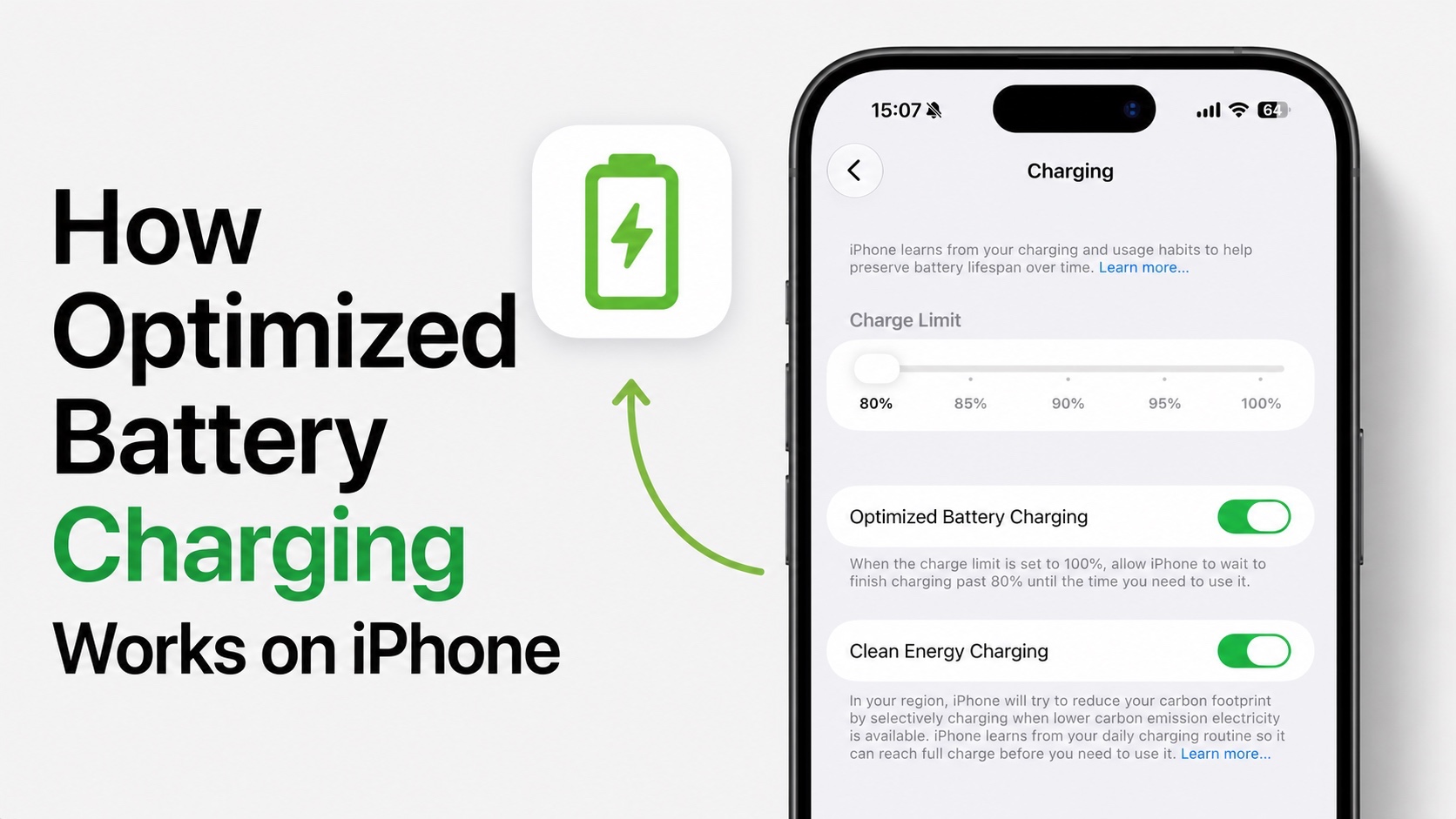
You may have noticed that your iPhone charges to 80%, then it seemingly stops charging for a hours before finally reaching 100% right before you wake up.
Sometimes when you have to leave home early and you unplug your device, the device is only charged up to 80%, even though it was on the charger the whole night.
At first glance, it might seem like there’s something wrong with your device, but it’s actually a feature called Optimized battery Charging. This feature is designed to help extend the lifespan on your iPhone’s battery.
What is Optimized Battery Charging?
All modern models of iPhones come with the Optmized Battery Charging feature. This feature is designed to slow down battery wear over time. Every charge cycle causes a tiny amount of chemical aging to the rechargeable lithium-ion battery in your iPhone. That ageing happens much faster when the battery spends long periods of time sitting at a full 100% charge.
With Optimized Battery Charging Apple reduces that unnecessary wear. Instead of charging your iPhone straight to 100% as quickly as possible, your iPhone learns your charging routine and delays the final part of the charge until shortly before you normally unplug your device.
This way the battery does not spend excessive time sitting at 100% charge and can still be fully charged whenever you are ready to use it.
How does Optimized Battery Charging Work?
Imagine you plug in your iPhone in or place it on its wireless charger at around 11PM and usually unplug your iPhone at around 7AM.
Instead og immediately charging the device to 100%, iOS will charge to around 80% and the pause the charging for several hours.
Then the device will automatically resume charging early in the morning and reach 100% just before 7AM.
All this is done after iPhone monitors your charging routine and uses on-device machine learning to recognize your charging habits.
If your charging schedule changes often, then the feature may activate less frequently because your iPhone is unable to identify a consistent routine.
Does iPhone always stops at 80%?
One of the biggest misconceptions that iPhone users have about Optimized Battery Charging is that their iPhone will always stop charging at 80% if they enable this feature. This is contrary to what’s actually happening. Most of the time your iPhone will still charge to 100%. The difference is when it reaches 100%.
If you are only plugging your iPhone for 20 or 30 minutes before heading out, your device won’t delay charging because it knows you need the battery immediately. The feature only activates during long charging sessions, which are typically occurring overnight for most people.
Things are different when you use the Charge Limit feature on your iPhone. That feature manually allows you to limit your iPhone to a certain charge level to protect battery.
If you want to charge your iPhone to 100% immediately, then you can also go to Settings -> Battery and tap on the Charge Now button. Doing so will instantly charge your iPhone to 100%.
Is Optimized Battery Charging feature worth using?
Yes, this is a useful feature that has long-term benefits for your iPhone. But it is important to understand what it actually does. It won’t magically double your iPhone’s battery life.
However it helps slow down the battery ageing process, which means your battery is more likely to maintain a higher maximum capacity over the course of several years compared with constantly sitting at 100% for long periods.
Optimized Battery Charging feature not working on iPhone?
If you feel like the Optimized eBattery Charging feature is not working on your iPhone, and you think the feature might be broken, there are several reasons it could happen.
- You don’t have a consistent charging routine.
- You frequently charge your iPhone at different times each day.
- You mainly use fast top-up charging instead of overnight charging.
- You recently restored your iPhone or switched to a new device, so it hasn’t learned your routine yet.
In these situations, your iPhone may simply charge normally to 100%.
How to enable or disable Optimized Battery Charging
You can easily enable or disable this feature by following these steps.

- Open the Settings app.
- Go to Battery.
- Tap on Charging.
- Turn on the toggle for Optimized Battery Charging to enable the feature.
- Turn the toggle off to disable it.
Conclusion
The Optimized Battery Charging is one of the those features that quietly works in the background. Once you turn it on, you may not even notice that is active and making a positive difference in your device’s battery health helping reduce battery wear and preserve your iPhone’s battery health.
So if you see your iPhone pause at around 80% overnight, then don’t worry, it is usually a sign that the feature is doing exactly what it is designed to do.


