


In this guide, you will learn how to turn 5G on or off on your iPhone that is running iOS 26 or later. No matter if you want to improve your iPhone’s battery life, want better cellular coverage, or just need to control when your iPhone switches to 5G, this guide will show you how to do it in a few simple steps.
Enable or disable 5G on iPhone
- Open Settings and tap on Cellular.
- On the next page, under SIMs, tap on the phone number you want to change this setting for.
- Next, find and tap on the Voice & Data option.
- Finally, from the list select the LTE option if you want to disable 5G altogether and switch to 4G only.
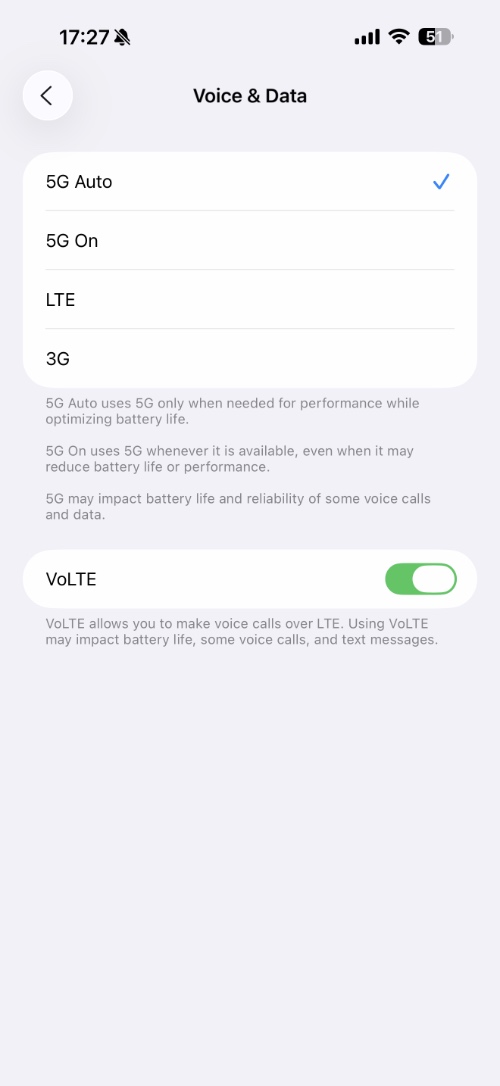
You can select the 5G Auto option if you want your iPhone to only use 5G when it needs to improve performance, while optimizing battery life.
You can select the 5G On option if you want your iPhone to take advantage of 5G whenever it is available, even if it results in reduced battery life.
That’s it, this is how you can enable or disable 5G on your iPhone and completely switch to 4G on devices running iOS 26 or later.
Disclosure: iOSHacker may receive a commission if you purchase products through our affiliate links. For more visit our privacy policy page.


