


Are you experiencing the issue in which your iPhone 18 Pro or iPhone 18 Pro Max is stuck, frozen, or has become unresponsive? If yes, then don’t fret, as that is exactly what we are going to help you with.
A hard reset or a force restart can quickly solve software-related issues with an iPhone 18 Pro. To do this, all you have to do is follow a button press sequence.
Hard Reset iPhone 18 Pro
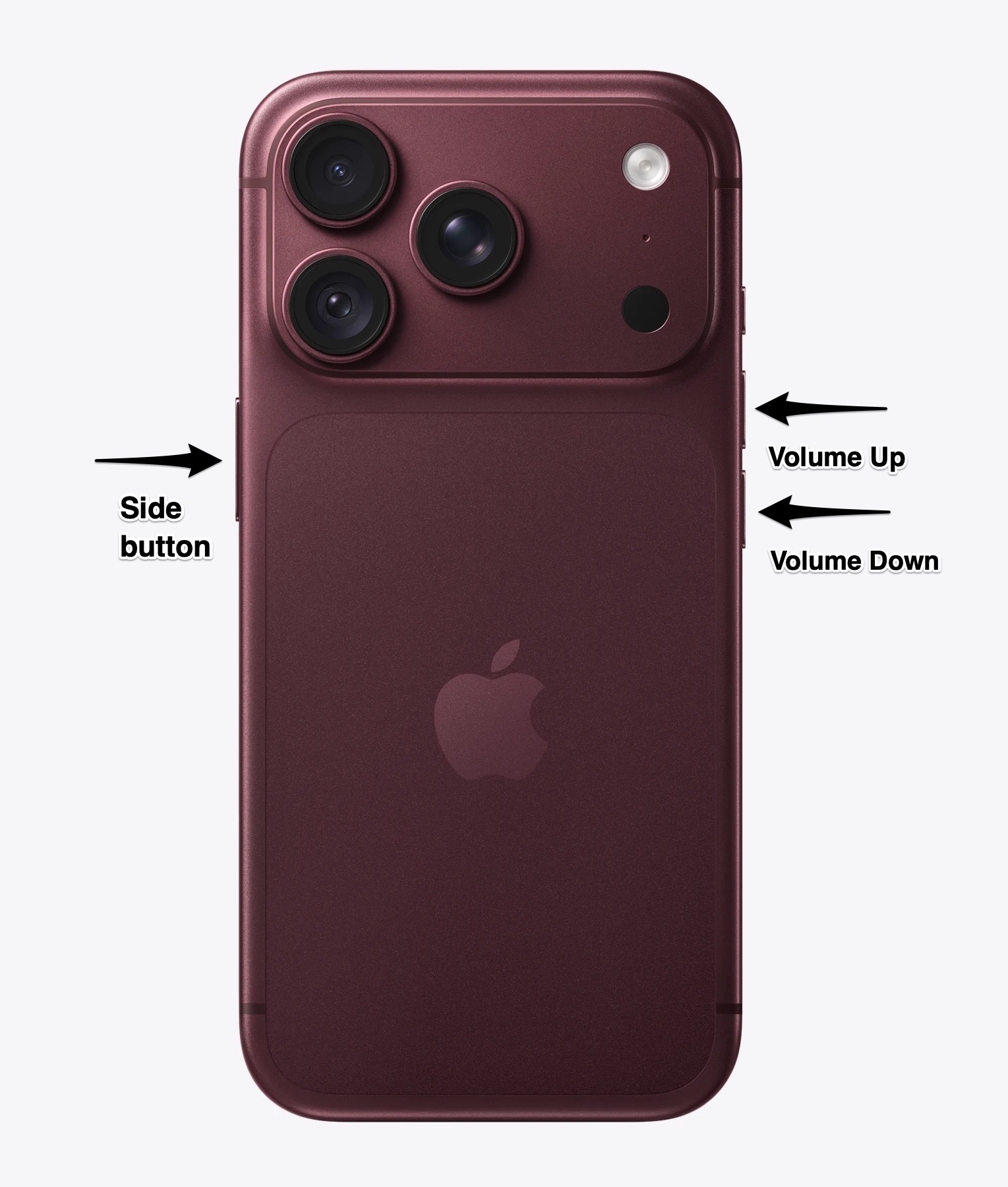
To hard reset an iPhone 18 Pro or iPhone 18 Pro Max, simply follow these steps.
- Press and quickly release the Volume Up button.
- Press and quickly release the Volume Down button.
- Finally, press and hold the Side button until the iPhone reboots.
You can let go of the button after you see the Apple logo on the screen. At this point, your iPhone will boot up normally, and you should be able to use it.
Remember, a hard reset does not delete any data on your device. It is simply a force restart that is suitable for solving several types of software issues with your device.
Here’s how you can put your iPhone 18 Pro in Recovery Mode.


