


Are you experiencing Battery Drain issues on your Apple Watch? If yes, then you would know how frustrating it is when your Apple Watch does not even last a full day.
Table of Contents
The good news is, there are several ways you can fix the battery drain problem on Apple Watch and make the Apple Watch’s battery last longer.
You can follow the simple and effective fixes outlined in this guide to stop Apple Watch battery drain and improve its battery life in just a few minutes.
Fix Apple Watch Battery Drain
1. Restart Apple Watch
One of the quickest and easiest ways to solve battery drain issues on an Apple Watch is to restart it. Here’s how it can be done.
- Press and hold the side button.
- Press the power button.
- Wait 10 seconds and turn the Apple Watch back on.
2. Turn off Background App Refresh
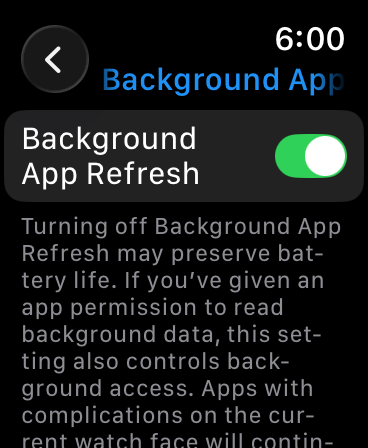
The Background App Refresh feature keeps apps updated. However, this feature also drains battery on an Apple Watch. To turn this feature off completely or for specific apps, follow these steps.
- Press the Digital Crown button to access the home screen.
- Find and open the Settings app.
- Here, tap on General.
- Then tap on Background App Refresh.
- Turn off the toggle for Background App Refresh to completely disable it. Or scroll down and turn off Background App Refresh for particular apps.
3. Disable Always-on Display
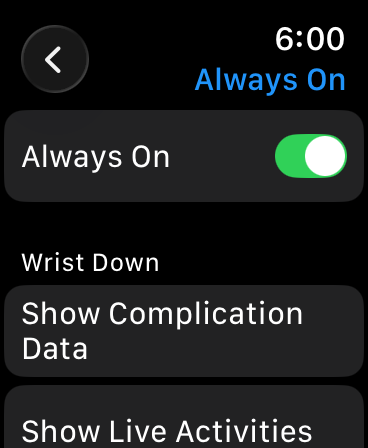
The Always-on Display feature is a major reason battery drains on Apple Watch, especially on older models. You can solve this by turning this feature off.
- Open the Settings app.
- Tap on Display & Brightness.
- Here, turn off Always On.
4. Reduce Screen Wake Time
You can improve Apple Watch battery life and stop battery drain by reducing screen wake time. To reduce screen wake time on your Apple Watch, follow these steps.
- Open the Settings app on your Apple Watch.
- Go to Display & Brightness.
- Here, tap on Wake Duration.
- Finally, select 15 seconds option.
5. Turn off Unnecessary Notifications
If your Apple Watch receives too many notifications, then they wake up your device’s screen often and causes the battery to drain. You can reduce the number of unnecessary alerts by following these steps.
- Open the Watch app on your iPhone.
- Tap on the My Watch tab from the bottom and then tap on Notifications.
- Here, scroll down and disable the toggles for apps you don’t want to receive alerts from.
6. Disable Raise to Wake
The Raise to Wake feature, that turn on the Apple Watch’s display when you turn your wrist, can also cause battery drain. To turn this feature off, follow these steps.
- On the Apple Watch, open the Settings app.
- Here, tap on Display & Brightness.
- Finally, turn off the toggle for Wake on Wrist Raise.
7. Update watchOS
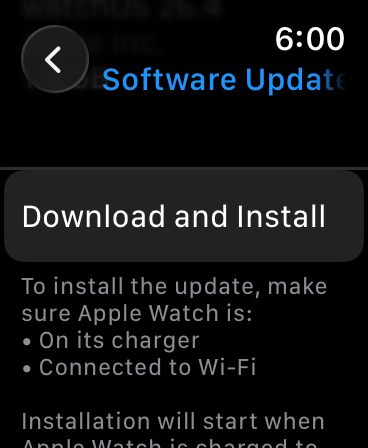
One of the most effective ways to improve battery life and stop battery drain is to update watchOS to the latest version. Apple fixes software bugs that cause battery drain, so keeping your Apple Watch updated can help improve its battery performance.
You can easily update your Apple Watch by following these steps.
- On your Apple Watch, open the Settings app.
- Tap on General.
- Here, tap on Software Update.
- Install the latest update if available.
8. Check Workout App and GPS Usage
The Workouts app running in the background can use GPS and drain battery faster. To prevent this, simply close the Workouts app from the App Switcher (double-press the Digital Crown and swipe left on the app card). Similarly, other apps that use GPS can also do the same damage, so turn them off, too.
9. Rest Sync Data
If nothing has worked so far, then Reset Sync Data for your Apple Watch. Here’s how.
- On your iPhone, open the Watch app.
- Tap on the My Watch tab and then tap on General.
- Here, tap on the Reset option.
- Finally, tap on Reset Sync Data.
10. Unpair and Re-pair Apple Watch
One of the most effective ways to prevent battery drain on your iPhone is to unpair and re-pair your Apple Watch. Here’s how you can do it.
- Open the Watch app.
- Tap on the All Watches button at the top.
- Tap on the ‘i’ button next to your Watch’s name.
- Then tap on Unpair Apple Watch.
- After it has unpaired, re-pair it again.
That’s it, these are some of the most effective ways you can stop battery drain on your Apple Watch and improve its battery performance. With these fixes, you can improve the battery health on any model of Apple Watch, and they work especially well on older models of the Apple Watch.


