


In this guide, we will share easy steps that will allow you to have your iPhone turn on Low Power Mode automatically whenever your iPhone’s battery goes below 20%.
In previous versions of iOS, such as iOS 18 or older, users had to rely on tedious workarounds to have their iPhone switch to Low Power Mode when they were running low on battery.
However, in iOS 26, Apple has provided an easier way to automate this process using the Adaptive Power Mode. Here’s how you can start using this feature.
Turn on Low Power Mode Automatically
- Start by launching the Settings app on your iPhone.
- Here, tap on the Battery option.
- Next, tap on Power Mode. This is also where you can turn on low power mode manually.
- Finally, turn on the toggle for Adaptive Power.
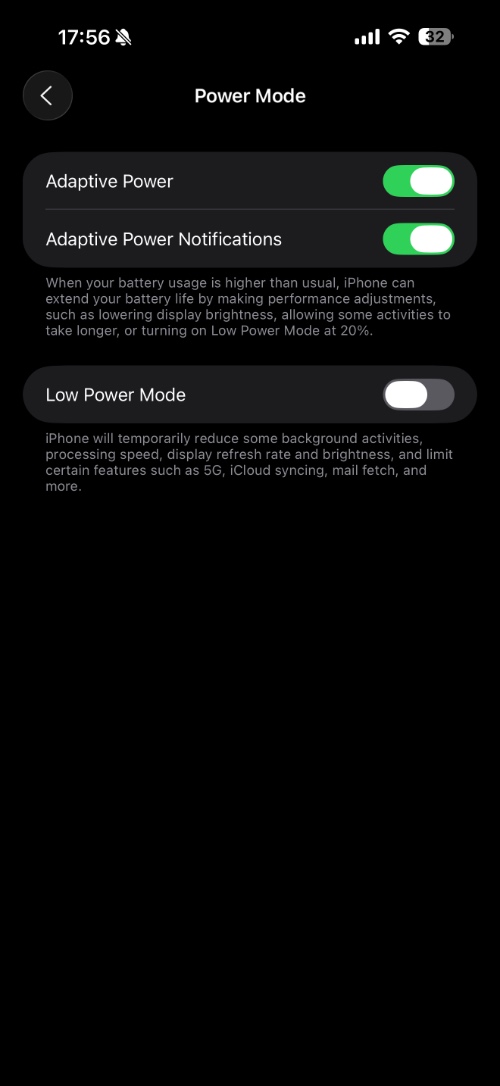
When Adaptive Power Mode is active, your iPhone will automatically turn on Low Power Mode on your device whenever its battery falls below 20% charge.
In addition to enabling Low Power mode at 20%, the Adaptive Power mode will also take steps to extend your battery life by making performance adjustments. This includes lowering display brightness and allowing some activities to take longer.
That’s it, this is how you can make your iPhone turn on Low Power Mode automatically whenever your iPhone is running low on battery.


