


What if you could run a full home server, a Plex media library, docker contains, run virtual machines, and backup your data, all in one sleek box sitting quietly on your desk? That’s what the UGREEN NASync DXP4800 Pro promises with its 4-Bay NAS design.
We have tested the NASync DXP4800 Pro in detail, and we have got a lot to share. So buckle up as we dive into our review of this powerful NAS device.
Also read:
- UGREEN NASync DH2300 Made Me Ditch iCloud – Review
- UGREEN NASync DH4300 Plus is an Affordable Home Cloud Solution For Everyday Users
First impressions and setup
Right out of the box, the UGREEN NASync DXP4800 Pro feels like a premium product. The build quality is solid thanks to its aluminum chassis. The minimalistic aesthetic of the DXP4800 Pro doesn’t scream ‘server closet’, which in itself is a big win, especially for those who want to set it up in their home or office.
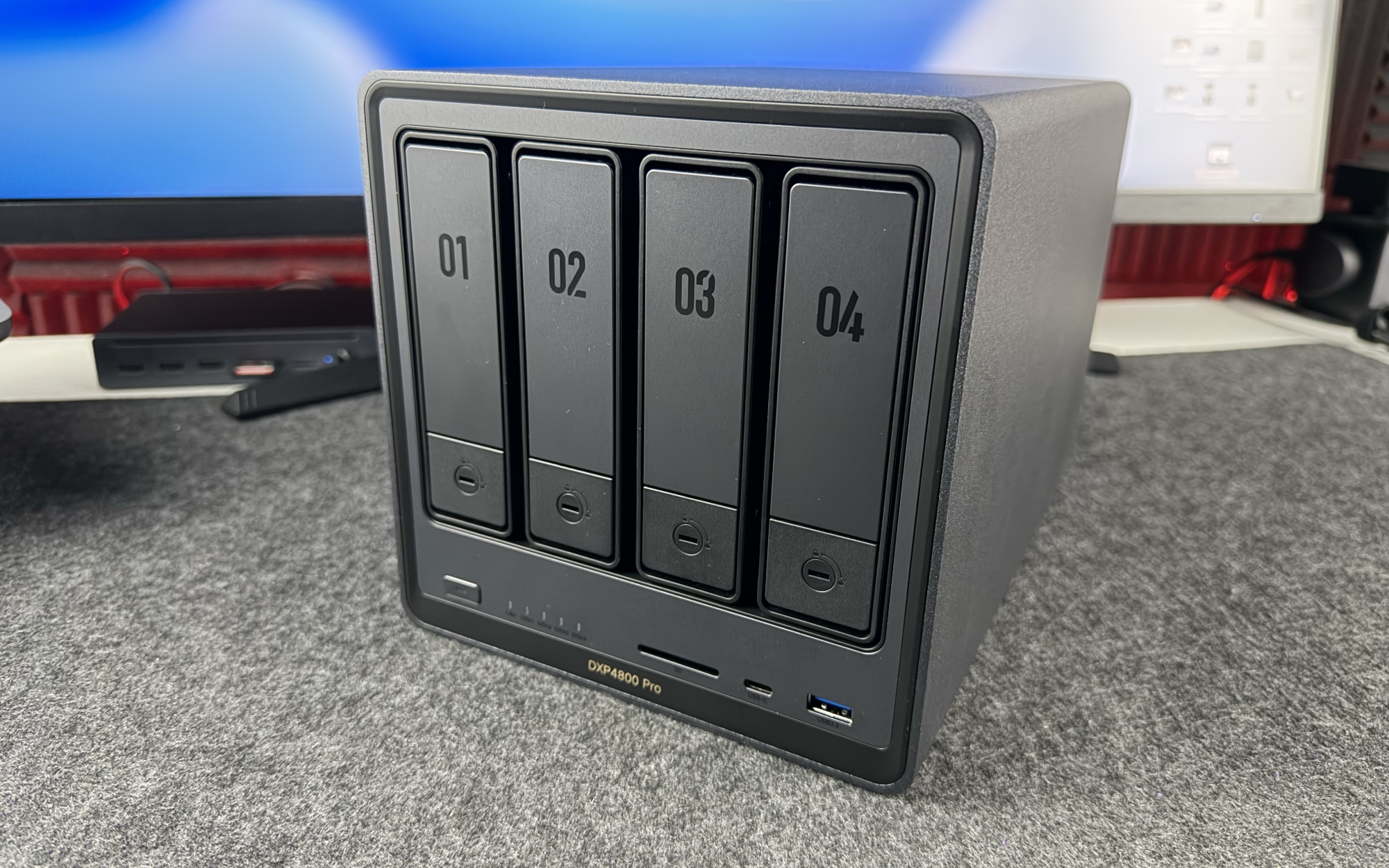
The Setup process is far more straightforward than you would expect. Simply add your NAS Hard Drives to the enclosure, plug in the power and Ethernet cables, and you are good to go.
The NAS device is detected by the app as soon as you fire up the UGREEN NAS app on your iPhone or your Mac, and it guides you through the whole process. Getting the unit up and running didn’t require much technical know-how, and the initial experience was confidence-inspiring.
Along with the NAS itself, you get an Accessory box that houses all the important components that you will need to get DXP 4800 Pro up and running. This includes a power adapter, an 8K HDMI cable, cooling pads for NVME SSDs if you choose to install them, and 2 keys to lock the drive bays.
Hardware and specs
The UGREEN NASync DXP4800 Pro is powered by an Intel Core i3-1315U processor and comes with 8GB of RAM, which can be expanded up to 96GB. You get 4 storage bays that can hold up to 144TB raw capacity combined.
There are dual M.2 NVMe SSD slots for caching and 2 Ethernet ports (10GbE + 2.5GbE).

On the front, you have a power on/off button, LED indicators that show you the power status and status of each NAS drive, an SD card reader, and one USB-C and one USB-A port to connect external hard drives.

At the back of the DXP 4800 Pro, you get an HDMI port, 3 USB-A ports, 2 Ethernet ports with one port supporting up to 10Gbps transfer speed, and a port for power input.

Despite featuring a large rear cooling fan and ventilation system, the NAS runs impressively quiet during everyday use. UGREEN has also included a removable magnetic dust filter at the back, which helps prevent dust buildup inside the chassis and on the fan itself, making maintenance easier while keeping the system running efficiently over time.
Storage, RAID & Capacity
This NAS device can hold up to 4 NAS Hard Drives in its storage bays. It supports up to 144TB of combined storage. The drives are sold separately, of course.
Once you install the HDDs, they can be configured through the UGREEN NAS app. RAID support covers all essential configurations, including RAID 0, 1, 5, and 10.
RAID 5, for example, dedicates one drive’s worth of space to parity data, meaning a single drive failure won’t result in data loss. It’s the kind of feature that feels unnecessary until the day it saves everything.
Software
The UGREEN NAS app and the UGOS Pro operating system are genuinely easy to use. It gives you access to all the features and controls that you can think of. You can manage files, install apps, configure storage, and change settings all in one place.
Running Plex as a music server directly on the NAS was a personal highlight. The i3 processor handles it without issue. UGOS Pro has also received recent updates that have improved system smoothness and responsiveness, which suggests UGREEN is actively investing in the platform.
That said, it’s worth being transparent: the native app ecosystem is smaller than what you will find on more established platforms like Synology. Many advanced services that use web servers, Git servers, and similar tools will require deployment via Docker. Docker is powerful, but it comes with a learning curve if you’re not already familiar with container-based setups.
Docker, Virtual Machines, and Home Lab Use
For home lab enthusiasts and self-hosters, this is where the UGREEN DXP4800 Pro really earns its price. Running Docker with 32GB of RAM and NVMe caching behind it (both added separately), the system handles containers smoothly. Running Plex, Jellyfin, and other self-hosted services becomes a breeze. Virtual machine support is built in, too, so spinning up Linux environments or isolated test systems is entirely feasible on this hardware.
Running OpenClaw on your NAS
UGREEN has recently launched the OpenClaw app on the App Center. This app lets you perform a one-click install of OpenClaw to your NAS and get a local AI assistant layer for your files with the AI model of your choice. Whether you prefer OpenAI, Gemini, DeepSeek, or any other locally-hosted model, this app lets you do it easily.
What makes this compelling on a NAS specifically is the privacy angle. Rather than pushing your data to external cloud services, it brings AI intelligence directly to where your data already lives. Your documents, photos, and media stay on the device while still being accessible to an AI agent. There’s no cloud dependency or an ongoing subscription to worry about.
Photo and video backups
This NAS also makes it incredibly easy for your entire family to automatically back up their iPhone photos and videos. Once you enable photo syncing, the NAS automatically transfers new photos and videos whenever the iPhone is connected to Wi-Fi, so you never have to worry about manually backing up memories again.
What makes the experience even better is the built-in AI-powered photo management system. The NAS can intelligently organize and categorize your library using people, location, and object recognition, making it much easier to search through thousands of photos and quickly find exactly what you’re looking for.
Pros & Cons
What Works Well
- Excellent hardware across the board: Fast Intel i3 processor, dual high-speed network ports, better USB, and quieter operation than expected
- Beginner-friendly setup for core features
- Strong day-one performance: file transfers and backups completed faster than anticipated
- Clean, intuitive UGOS Pro interface
- Docker and VM support unlock serious capabilities for power users
- OpenClaw integration brings local AI to the NAS without cloud dependency
- Active software development with meaningful OS updates
Where It Falls Short
- Long-term reliability is yet to be confirmed, even though early impressions are positive, but the real test is time
- The native app ecosystem is smaller than established competitors
- Docker is required for many services, which is not beginner-friendly for advanced setups
Verdict
The UGREEN NASync DXP4800 Pro is a genuinely impressive piece of hardware that punches above its weight class. The Intel i3 processor, dual high-speed networking, NVMe caching, flexible RAID options, and now OpenClaw local AI support combine to make this one of the most capable NAS devices available at its price point.
It’s best suited to home lab enthusiasts, content creators, and privacy-conscious users who want a capable local server without cloud dependency. If you’re comfortable with Docker or willing to learn, the ceiling on what this device can do is remarkably high. If you’re looking for a fully polished, plug-and-play experience on par with more mature platforms, be prepared for some rough edges in the software ecosystem.
I was really impressed by the speed and reliable performance that was shown by this NAS and recommend it for anyone who is looking for a powerful home NAS solution that is capable of doing more than just storing backups.
UGREEN NASync DXP4800 Pro Review
UGREEN NASync DXP4800 Pro ReviewPricing and availability
The UGREEN NASync DXP4800 Pro is available at a price of $799.99. You can get a discount on this NAS right now as it is selling at a discounted priceof $719.99.


