


Are you facing the issue where the volume buttons are not working on your iPhone? In this guide, we will share detailed solutions that will help you fix this issue and get volume buttons working normally again.
Many users face the issue where the volume won’t go up or down, even when you press the Volume Up or Volume Down buttons. When this happens, the volume buttons seem completely unresponsive, which can be really frustrating when you are trying to adjust volume during a call, listening to music, or adjusting the ringtone volume.
Fix Volume Buttons Not Working on iPhone
Fix 1: Remove any Case or Obstruction
First and foremost, make sure your iPhone case is not blocking the volume buttons. Various iPhone cases, especially thick and bulky ones, can press against the buttons or prevent them from being pressed properly.
Try removing the iPhone’s case, and press the volume buttons again.
It is also a good idea to check for debris and dust around the volume buttons and inside the case, and clean the case thoroughly.
Fix 2: Use Control Center or Settings to adjust volume
If the volume buttons are not working, then it might be due to a software issue. Try adjusting the volume through the Control Center (swipe down from the top right corner).
You can also change the volume from the Settings app. Go to Settings -> Sounds & Haptics and adjust the volume from there.
Fix 3: Check Sound Settings
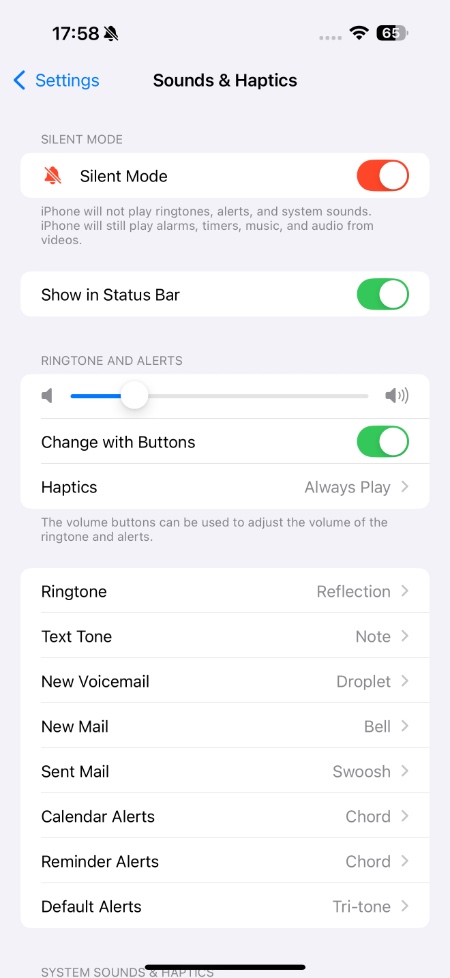
More often than not, the issue is related to sound settings rather than volume buttons themselves.
Go to Settings -> Sounds & Haptics and make sure the toggle for ‘Change with Buttons’ is turned on.
If this option is disabled, then volume buttons won’t adjust the ringer volume.
Fix 4: Force restart your iPhone
A quick restart can solve software glitches and get volume buttons working again. To restart your iPhone, follow these steps.
- Press and release the Volume Up button.
- Press and release the Volume Down button.
- Press and hold the Side button until the Apple logo appears.
If volume buttons are not working on your device, you can still restart your iPhone using the Settings app.
Just go to Settings -> General and tap on the Shut Down option. Slide to power off, wait 10-15 seconds, and turn the device back on.
Fix 5: Check for Hardware Issue
If none of these fixes have worked so far, then the issue might be hardware-related. Try pressing the buttons several times and see if they feel stuck or loose. If buttons are not clicking properly or don’t respond, then there could be internal damage.
In this case, get your device inspected at an Apple Store or an Apple Authorised Repair Center.
That’s it, this is how you can solve the volume buttons not working issue on your iPhone and get it working again.


